Breaking Down the Offline-Online Wall: Building an Omnichannel Strategy That Connects Every Channel with SAP Business One

Updated: 6 days ago
Selling on every channel isn't hard. Keeping the data consistent across all of them is.
A customer sees a product on Facebook, orders through LINE OA, checks stock on Shopee, then picks it up in-store - it sounds like a seamless experience. But behind the scenes at many businesses, it's a completely different story.
In-store stock doesn't match what's posted online. Staff have to check inventory across multiple Excel files before answering a customer. Prices in-store and on the marketplace don't line up. And the accounting team has to manually reconcile orders from every channel at the end of every month.
So the real question is: is the problem actually at the "storefront," or is it at the "back office"?
This article looks at where true omnichannel really begins, and why a back-office system like SAP Business One is the key that makes the strategy actually work.
Multichannel vs. Omnichannel: What's the Difference?
Many businesses believe they're already doing omnichannel because they sell through a physical store, a website, Facebook, and marketplaces.
But if stock in each channel is a separate data set, prices don't match, and the same customer's purchase history is scattered across different systems, that's multichannel - not omnichannel.
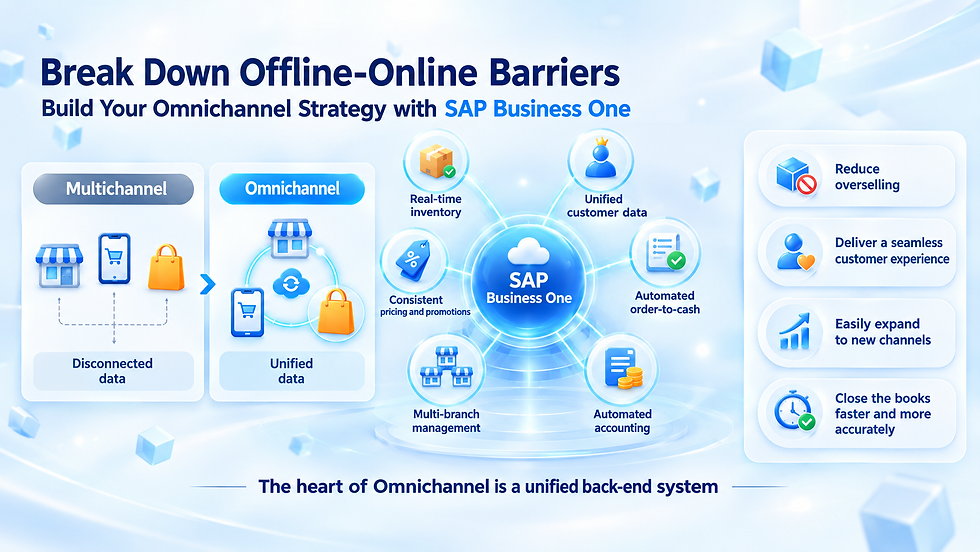
Multichannel - selling through many channels, but each one operates independently. Data isn't connected.
Omnichannel - every channel is connected, drawing on the same stock, pricing, and customer data. No matter which channel a customer enters through, they get accurate, consistent information.
The difference isn't about how many channels you sell on - it's about whether the data behind them is connected.
The Heart of Omnichannel Isn't the Storefront - It's the Back Office
A food delivery app, an e-commerce site, or a Facebook page is the part customers see. But what actually makes that experience seamless is the system running behind every channel.
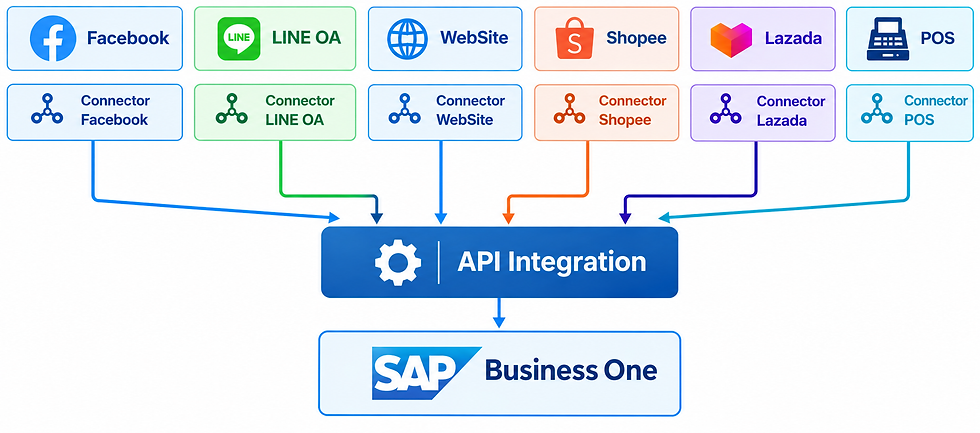
One thing worth being clear on: these sales channels don't automatically send data into SAP Business One on their own. They need to go through Integration, or be connected via an API / Connector, first. Only then can the back-office system correctly capture orders, stock, and customer data from every channel.
When every channel draws from the same source, what customers see is always consistent - whether that's remaining stock, selling price, or order status.
How Does SAP Business One Support an Omnichannel Strategy?
The approach is easiest to understand through six core capabilities.
1. Real-Time Stock, So You Never Oversell
Whenever a product is sold through any channel - whether in-store or online - the stock quantity in SAP Business One updates instantly. Every channel then sees the same number, eliminating the problem of customers ordering items that are already out of stock.
2. Unified Customer Data
Whether a customer has bought in-store, on the website, or through a marketplace, their purchase history and contact information are consolidated in one place. This lets sales staff and the customer service team see a complete picture of that customer without having to switch between multiple systems.
3. Consistent Pricing and Promotions Across Every Channel
Prices and discounts set in SAP Business One can be synced to both online and physical storefronts at the same time, reducing the problem of customers encountering mismatched prices between channels - which helps build trust in the brand.
4. Orders from Every Channel Flow into One System Automatically
Orders from the website, marketplaces, and the physical store are recorded into SAP Business One automatically, reducing duplicate data entry steps and the errors that come from manual input.
5. Manage Multiple Branches and Warehouses in One View
This gives visibility into stock at each branch or warehouse at the same time, enables more accurate planning of stock transfers between branches, and allows immediate decisions on which warehouse should fulfill an order fastest.
6. Sales and Finance Data Connected, Less Manual Reconciliation Across Channels
When sales data, invoices, and payment receipts from every channel are automatically recorded into the same accounting system, the accounting team saves significant time on end-of-month reconciliation.
Omnichannel Has to Start From Each Function's Business Outcome
An omnichannel strategy shouldn't start with picking as many sales channels as possible - it should start with the outcome each function actually needs.
In-store sales - accurate stock visibility, so they don't lose a customer by selling something that isn't really there.
Online marketing - promotions and pricing that stay consistent with the store, so customers aren't confused.
Warehouse - a single view of stock across every branch, for more accurate replenishment planning.
Customer service - complete customer history, no matter which channel a customer reaches out from.
Finance and accounting - matching sales figures across every channel, for faster, more accurate closing.
Once the desired outcome for each function is clear, the next step is deciding which channels to connect to SAP Business One first, and which come later.
How Should an Organization Start Building an Omnichannel Strategy?
1. Map the Cross-Channel Customer Journey
Understand which channels your customers actually move through before completing a purchase - for example, seeing a product on Facebook and then ordering in-store, or checking stock in an app before picking it up themselves.
2. Decide Which Channels to Connect First
You don't need to connect every channel at once. Start with whichever channel has the biggest stock or data-mismatch problem.
3. Standardize Product and Pricing Data
Before connecting systems, check that product data, pricing, and product codes used across each channel are consistent, to avoid confusion once everything is connected.
4. Choose an Integration Approach That Fits the Business
Decide how SAP Business One will connect to online channels, based on the number of channels involved and the business's order volume.
5. Prepare Your Team for Real-Time Data
Once stock and orders update automatically, in-store and warehouse teams need to shift to trusting the data in the system, instead of relying on manual stock counts as before.
6. Measure Results, Then Keep Expanding
Track metrics such as the overselling rate, order-processing speed, or the accuracy of sales figures across channels, before connecting the next channel.
Good Omnichannel Should Make the "Seams" Invisible to Customers
The end goal of an omnichannel strategy isn't having the most sales channels possible - it's making sure customers never feel the seams between them.
A customer gets the same information no matter where they buy → Accurate stock, matching prices → Staff on every channel see the same data → The business can scale into new channels without rebuilding the system each time
Once the back office is strong enough, adding a new sales channel in the future stops being a fresh start every time - it becomes another layer built on a foundation that's already there.
Why Choose ACTRAN Systems?
Making an omnichannel strategy work takes an understanding of retail business, multi-channel sales processes, and proper system integration, all at once.
As a SAP Partner and SAP Business One provider in Thailand, ACTRAN Systems advises on SAP Business One from setting up the accounting system and Integration, through to post-implementation support - with a focus on connecting the back office to the sales channels a business actually uses.
Our services cover:
Business Process Analysis for retail and omnichannel businesses
SAP Business One Implementation
Planning the connection between SAP Business One and online and in-store channels
Data Migration & Integration
Training & Change Management
Go-Live and Post-Go-Live Support
Good omnichannel shouldn't be measured only by "how many channels can you sell on?" The better question is: "does every channel show customers the same, accurate information?"
Ready to Break Down the Offline-Online Wall for Your Business?
Whether you're looking for an ERP system to connect multi-channel sales, or considering SAP Business One for your business, the ACTRAN Systems team is ready to help - from process analysis through to Integration design and post-implementation support.
We're ready to help your organization: map the Customer Journey → organize your data → connect your systems → build the back office → keep expanding into new channels
Connecting your sales channels together could be the step that lets your business scale sales without limits.
ACTRAN Systems Co., Ltd.
SAP Partner in Thailand
📧 Email: sales@actran.co.th
📞 Tel: +66 (0) 2679-1668
🌐 Website: www.actran.co.th
💬 LINE ID: @actransystems